


A Facility Manager's Guide to Operations, Compliance, and CMMS Success
Managing a facility means keeping physical assets running while balancing tight budgets, strict compliance standards, and unexpected equipment failures. On any given day, a facility manager might handle an emergency HVAC breakdown, prepare for a life safety audit, manage vendor contracts, and resolve resident or staff work requests.
When critical machinery breaks down without warning, repairs cost more, safety risks rise, and facility operations grind to a halt. Moving from reactive troubleshooting to structured maintenance requires clean communication, clear processes, and reliable data.
Modern facility teams use a CMMS (Computerized Maintenance Management System) to centralize work requests, automate preventive checks, and keep historical maintenance records in one secure place.
Key Takeaways
- What Are the 5 Main Responsibilities of a Commercial Facility Manager?
Facility managers oversee daily operational efficiency, emergency management, capital planning, maintenance tracking, and vendor contracts. - How to Transition from Reactive Maintenance to Preventive Maintenance Using Software
Switching from manual spreadsheets to scheduled preventive maintenance helps prevent costly equipment failures and extends asset life. - What Are the Best CMMS Software Features for Healthcare, Senior Living, and Manufacturing Compliance?
Selecting software features tailored to your specific sector simplifies regulatory compliance and daily reporting. - How Does a CMMS Help Facility Managers Reduce Equipment Downtime?
Using software to log work orders, automate schedules, and track inventory gives technicians immediate access to asset histories on the facility floor. - What Is the ROI of Implementing Computerized Maintenance Management Software?
Implementing digital maintenance workflows cuts unplanned downtime, optimizes labor, and lowers total operational costs.

What Are the 5 Main Responsibilities of a Commercial Facility Manager?
Keeping a facility safe, comfortable, and functional requires managing five primary operational domains every day.
1. Operational Efficiency
Coordinating daily facility tasks, space planning, and occupant requests.
- Work order routing
- Space allocation
- Occupant communication
- EHS compliance
2. Emergency & Risk
Assessing hazards and maintaining safety response protocols.
- Disaster recovery plans
- Life safety equipment checks
- Physical security controls
- Incident reporting
3. Capital Planning
Evaluating asset life cycles and managing long-term capital budgets.
- Life cycle cost analysis
- Energy management
- Multi-year capital forecasting
4. Maintenance & Assets
Balancing preventive routines with real-time asset tracking.
- Preventive maintenance (PM)
- Asset lifecycle tracking
- Inventory & spare parts
5. Vendor Management
Overseeing third-party contracts, insurance, and service levels.
- SLA enforcement
- COI & compliance tracking
- Invoice reconciliation
How to Transition from Reactive Maintenance to Preventive Maintenance Using Software
Shifting from manual tracking methods to a digital CMMS transforms daily maintenance workflows:
| Operational Feature | Traditional / Manual Process | CMMS Process | Practical Impact |
|---|---|---|---|
| Work Requests | Paper notes, phone calls, verbal requests | Digital web portal, mobile CMMS app, QR tags | Eliminates lost requests and speeds up response times |
| Maintenance Strategy | Reactive ("run-to-failure") approach | Scheduled Preventive Maintenance (PM) | Reduces emergency breakdowns and extends asset lifespans |
| Record Keeping | Paper binders, spreadsheets, memory | Centralized cloud database | Keeps maintenance records audit-ready at all times |
| Parts & Stock | Manual counts, emergency part orders | Automatic inventory updates and reorder alerts | Prevents repair delays caused by missing parts |
| Technician Workflows | Paper tickets, manual check-ins | Digital tasks assigned directly to mobile devices | Reduces travel time and keeps technicians organized |
| Maintenance Data | Hard-to-track historical notes | Clear reports on completion rates and costs | Provides accurate data for budget planning |

What Are the Best CMMS Software Features for Healthcare, Senior Living, and Manufacturing Compliance?
Different industries face distinct operational demands and regulatory standards. A practical Computerized Maintenance Management System provides functional features tailored to these specific needs:
- Healthcare Facilities: Simplifies Environment of Care (EOC) inspections, Joint Commission compliance logging, infection control documentation, and life safety check tracking.
- Manufacturing Plants: Tracks machine maintenance history, supports meter-based PM schedules, monitors spare parts usage, and helps reduce unexpected line shutdowns.
- Senior Living Communities: Organizes resident maintenance requests, streamlines room turnover tasks, tracks call-bell checks, and stores compliance logs for state inspections.
- Hospitality & Resorts: Speeds up guest room repair requests, organizes preventive care for HVAC and pool systems, supports housekeeping tasks, and tracks maintenance across multiple buildings.
How Does CMMS Compare to CAFM and EAM Software?
When evaluating facility management technology, managers frequently encounter three different software acronyms: CMMS, CAFM, and EAM. While they share overlapping features, each platform serves a distinct primary function:
- CMMS (Computerized Maintenance Management System): Focused on tactical maintenance operations. A CMMS streamlines work order processing, preventive maintenance scheduling, spare parts inventory, and technician workflows to minimize equipment downtime.
- CAFM (Computer-Aided Facility Management): Focused on physical space management. CAFM software tracks building floor plans, room bookings, hot-desking, seating assignments, and occupancy analytics.
- EAM (Enterprise Asset Management): Focused on full asset financial lifecycles. EAM systems track large-scale enterprise assets from procurement through depreciation to final disposal, often integrating directly with corporate accounting and ERP platforms.
The Operational Takeaway: For facility teams looking to solve day-to-day equipment breakdowns, keep technicians organized, and maintain audit-ready safety logs, a dedicated CMMS provides the most immediate ROI without the unnecessary cost or complexity of enterprise EAM or CAFM platforms.

How Does a CMMS Help Facility Managers Reduce Equipment Downtime?
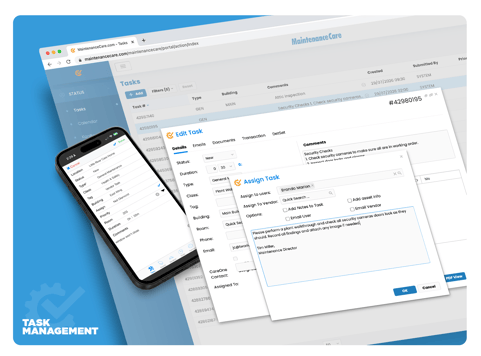
Managing maintenance across multiple facilities using paper or spreadsheets leads to miscommunicated tasks, delayed repairs, and missed preventive checks. A central Computerized Maintenance Management System streamlines daily workflows by organizing work orders, PM schedules, and asset details in one digital location.
|
|
|
Key Functional Capabilities of a CMMS |
|
|
A CMMS (Computerized Maintenance Management System) |
|
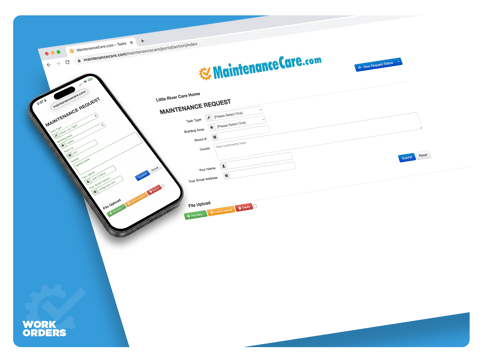
1. Automated Work Order ProcessingUsing work order management software, staff can submit service requests through a simple online portal or by scanning a QR code on an asset. The system routes the ticket to the appropriate technician based on location and priority. |
 |
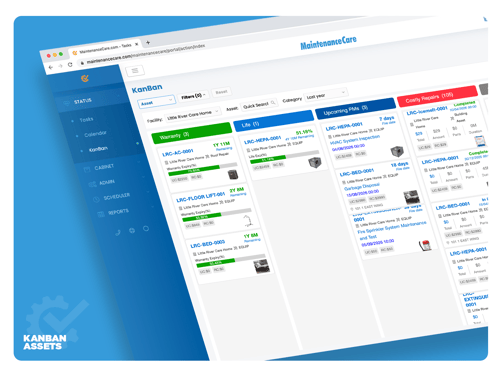 |
2. Scheduled Preventive MaintenanceRather than relying on memory, automated preventive maintenance software generates work orders based on time intervals (e.g., monthly filter changes) or usage metrics (e.g., generator oil changes after 100 operating hours). |
in the Field |
|
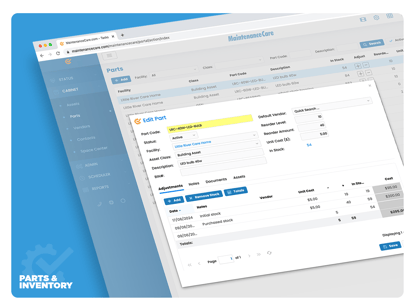 |
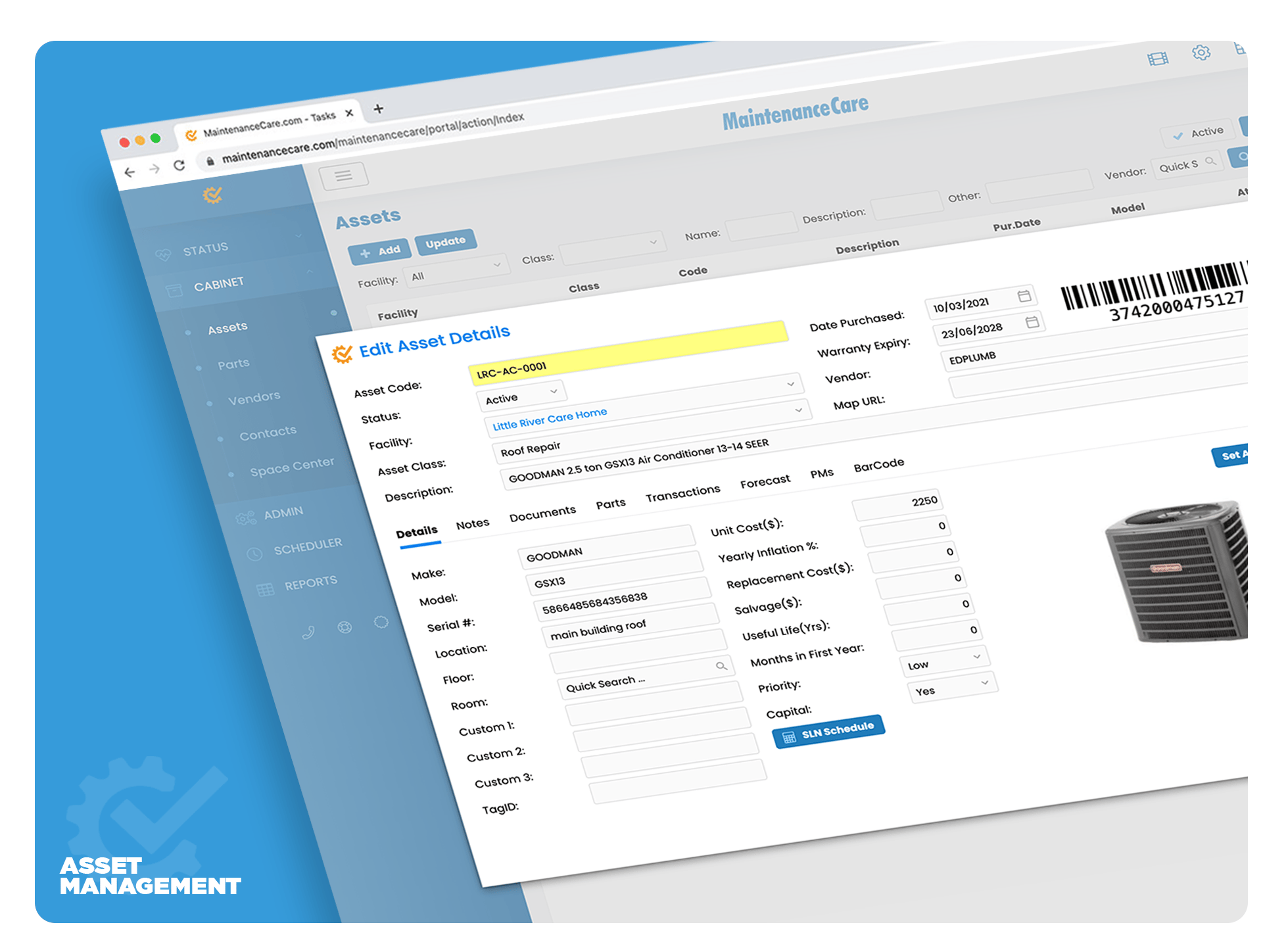
4. Inventory & Parts ManagementIntegrated parts and inventory management tracks stock levels as parts are used on work orders. Setting minimum thresholds alerts managers when it is time to reorder critical components. |
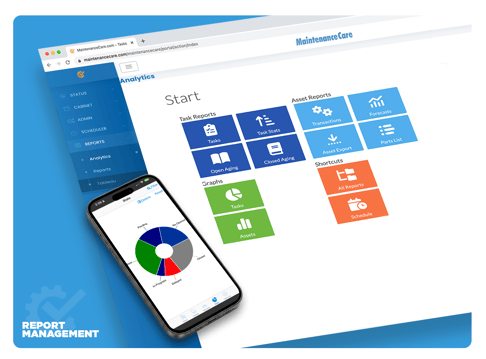
5. Reporting & Maintenance MetricsBuilt-in reporting tools in asset tracking software calculate key performance indicators—such as open vs. closed work orders, average response times, and total spend per asset—giving managers real data to support capital requests. |
 |
|
|
6. Asset Lifecycle & Equipment TrackingDedicated asset tracking software maintains complete service histories, warranty documentation, meter readings, and depreciation schedules for every piece of critical facility machinery. |
What Is the ROI of Implementing Computerized Maintenance Management Software?
1. Reduced Repair Costs & Downtime
Unplanned breakdowns usually require emergency contractor call-outs, expedited parts delivery, and overtime labor. Following a consistent preventive maintenance routine with CMMS software addresses minor wear and tear before it causes costly system failures.
2. Improved Technician Efficiency
When technicians do not have to search for paper work orders, track down manual inventory counts, or return to an office for job details, they spend more time completing repairs. Using a mobile CMMS app keeps work details accessible right on the job site.
3. Extended Asset Lifespan
Regular servicing keeps motors, pumps, air handlers, and electrical components working within normal design parameters. Consistent care delays capital replacement costs and helps facilities get full value from their equipment investments.
FAQ's
Simplify Your Facility Maintenance Operations
Replacing paper logs and disorganized requests with straightforward CMMS software brings clarity and structure to daily maintenance operations.
Ready to Streamline Your Maintenance?
Take control of work orders, simplify preventive maintenance, and organize your facility assets with Maintenance Care.
- Explore Practical CMMS Features: See how Maintenance Care helps organize work orders, PM schedules, and assets across your facility.
- Book a Walkthrough Consultation: Schedule a live demo tailored to your operational workflows with our team.
- Calculate Cost Savings: Estimate potential savings from improved maintenance efficiency and reduced equipment downtime.
 |
 |


.svg)