


Managing maintenance across schools and universities isn't quite like managing any other facility. Between aging buildings, limited budgets and academic schedules that leave little room for disruption, maintenance teams have a lot to juggle. Then there's the challenge of coordinating everyone involved. A custodian might discover a heating problem at an elementary school, but the HVAC technician responsible for fixing it could be working at another school across the district.
That's why choosing the right Computerized Maintenance Management System (CMMS) is about more than tracking repairs. It's about connecting people, organizing maintenance across buildings and giving teams the information they need, wherever they're working.
So, what is the best CMMS for schools and universities in 2026? Let's look at what educational facilities actually need, how leading software platforms compare and what school districts should consider before making a decision.
Key Takeaways:
- The best CMMS fits how schools operate. School districts often rely on on-site custodians and shared maintenance technicians who travel between buildings.
- Mobile maintenance matters. Technicians need access to work orders, equipment information and repair histories without returning to a central office.
- Daily maintenance deserves attention. Digital task lists can help custodians organize recurring responsibilities by classroom, washroom or common area.
- User access affects collaboration. MaintenanceCare includes unlimited users and Multi Facilities in its paid plan, supporting maintenance coordination across schools.
- Compare the full cost. Consider users, facilities, required functionality and implementation needs rather than choosing based on an advertised monthly rate alone.
What Is CMMS Software for Schools?
A CMMS for schools is software that helps educational institutions manage maintenance requests, schedule preventive maintenance, track equipment and organize repairs across their facilities. Instead of relying on emails, paper forms or spreadsheets, schools can keep maintenance information in one centralized system.
For an elementary school, that might mean submitting a request to repair a classroom heating system or maintaining daily custodial task lists. For a university, it could involve coordinating maintenance across residence halls, research buildings, recreation facilities and mechanical systems. The goal is to give maintenance teams a clearer picture of what needs attention, who's responsible and what's already been completed.
Learn more about MaintenanceCare's educational facility management solutions.
Why School Maintenance Is Different
Schools face many of the same challenges as commercial buildings, but how they organize maintenance can be very different.
On-Site Custodians and Shared District Technicians
Many school districts rely on two types of maintenance personnel. On-site custodians handle daily building operations, minor repairs and reporting problems that require specialized attention. They know their buildings and are often the first to notice when something isn't working properly.
District maintenance technicians, on the other hand, handle larger or specialized repairs. Electricians, plumbers, HVAC technicians and other tradespeople may travel between several schools in a single day. Larger high schools sometimes have dedicated maintenance crews, while smaller elementary schools may rely more heavily on district-wide resources.
That creates an important challenge: the person reporting a problem, the person assigning the work and the technician completing the repair may all be working in different buildings. A CMMS helps connect them.
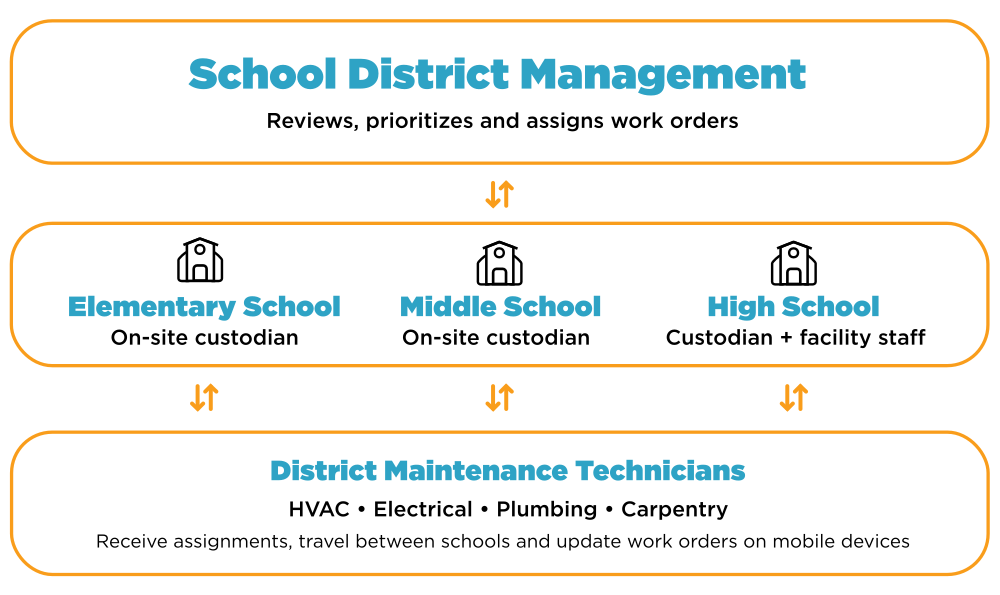
How school district maintenance works: on-site custodians, shared maintenance technicians and district facilities management stay connected through a centralized CMMS.
What Does That Look Like in Practice?
Imagine an elementary school's head custodian discovers that several classrooms aren't heating properly. They submit a maintenance request through the CMMS, where the district facilities manager reviews the request, assigns a priority and dispatches an HVAC technician who services multiple schools.
The technician receives the work order on their mobile device, reviews the equipment information and travels to the school. Once the repair is completed, they document the work and update its status without returning to the maintenance office. Meanwhile, the custodian and facilities manager can stay informed.
Everyone has access to relevant maintenance information, even though they aren't working in the same location. That's the value of combining work order management with a mobile CMMS.
Why Mobile CMMS Software Matters for School Districts
For technicians travelling between schools, mobile access isn't just convenient. It's an important part of getting work done efficiently. A district HVAC technician might respond to a heating issue at one school, complete a preventive maintenance inspection at another and finish the day investigating equipment problems at a third.
With a mobile CMMS, technicians can access assigned work, review equipment information, attach photos and document repairs while they're on-site. This reduces reliance on printed work orders and repeated phone calls while giving facilities managers better visibility into maintenance progress.
For districts using MaintenanceCare, the Multi Facilities capability helps organizations manage maintenance across buildings, while mobile access supports technicians who move between schools throughout the day.

What Features Should Schools Look for in a CMMS?
Not every school needs advanced enterprise software. A small elementary school will have different requirements from a university managing dozens of buildings. However, several capabilities are worth prioritizing.
| Feature | Why It Matters |
| Work Order Management | Helps custodians and staff submit repair requests while managers assign, prioritize and track repairs. |
| Daily Tasks & Checklists | Helps custodians organize recurring tasks by classroom, washroom or common area and document completed work. |
| Preventive Maintenance | Schedules recurring equipment inspections and servicing to reduce the risk of unexpected breakdowns. |
| Mobile Access | Allows custodians and technicians to access assignments, document maintenance and update work orders while moving between rooms or schools. |
| Asset Tracking | Maintains equipment histories, repair records and replacement information. |
| Multi-Facility Management | Helps districts coordinate maintenance activities and reporting across school buildings. |
| Flexible User Access | Supports participation from custodians, technicians, administrators and facility managers. |
| Reporting & Cost Tracking | Provides visibility into maintenance activity, outstanding repairs and equipment history to support planning and budgets. |
Daily Checklists for Smaller Schools
For smaller schools, a CMMS can also help organize the daily responsibilities that keep the building running. A custodian might work through recurring tasks for classrooms, washrooms, hallways and common areas, documenting which inspections or maintenance activities are complete.
Instead of relying entirely on paper checklists or memory, digital tasks can provide a record of completed work and outstanding responsibilities. These activities can be organized through scheduled tasks and appropriate maintenance forms, depending on the software. For larger schools, the same approach can help supervisors coordinate responsibilities across multiple staff members.
Preventive Maintenance Around the Academic Calendar
Schools have limited opportunities to complete disruptive maintenance work. Summer vacation, winter breaks and weekends often become important windows for inspections, repairs and equipment servicing.
Preventive maintenance software helps facilities teams schedule recurring tasks and document completed work instead of relying on memory or reacting when something breaks.
For more seasonal maintenance ideas, read School Maintenance When Classes Are Out.
Comparing CMMS Software for Schools and Universities in 2026
Several established CMMS platforms offer tools that can support educational facility maintenance. The best fit depends on the organization's size, maintenance structure and operational priorities. The following comparison highlights each provider's primary focus, capabilities and pricing approach.
| CMMS Platform | Primary Focus | Key Strengths | Free Plan | Paid Pricing Approach |
| MaintenanceCare | Facility maintenance management | Unlimited users, Multi Facilities, work orders, preventive maintenance and mobile access | Free Forever; 2 users with limited features | Unlimited Users: $250/month; Enterprise Elite custom pricing |
| MaintainX | Maintenance and operational workflows | Mobile maintenance, digital procedures and standardized checklists | Free plan with limits on repeating work orders and procedures | User-based paid plans |
| UpKeep | Asset operations and maintenance management | Mobile work orders, asset management and preventive maintenance | Free trial; free requester access on eligible paid plans | Per-user plans and enterprise options |
| Limble | Maintenance and asset management | Work orders, preventive maintenance, asset tracking and reporting | No permanent free tier advertised | Paid licensing tiers and enterprise options |
| Fiix | Maintenance management and asset reliability | Preventive maintenance, multi-site management and analytics | Free plan with user and PM limits | Per-user paid plans and custom Enterprise pricing |
Comparison based on publicly advertised product capabilities and pricing approaches as of October 2026. Features and limitations vary by plan and may change. Contact each vendor for current details.
Which CMMS Is Right for Your School?
Each CMMS platform offers different strengths, and the right choice depends on the needs of your educational facility. Some prioritize mobile accessibility and streamlined work orders, while others offer advanced asset management, digital procedures or reporting capabilities. The key is finding a solution that supports your maintenance team's daily responsibilities, accommodates your facilities and provides the flexibility to grow with your organization.
MaintenanceCare is worth considering for schools and universities that want work orders, preventive maintenance, mobile access, unlimited users and Multi Facilities within one platform. The most useful comparison isn't simply which system offers the longest feature list, but how well each platform supports the way a school's maintenance team actually operates.
Are Free CMMS Plans Enough for Schools?
Free maintenance software can be a practical starting point for smaller schools moving away from paper work orders and spreadsheets. MaintenanceCare, MaintainX and Fiix offer permanent free plans, although their limitations differ. Other providers may offer trials or evaluation options.
MaintenanceCare's Free Forever Plan includes two users, work orders, three preventive maintenance schedules, five assets, three vendors and Mobile App Lite. For a small school with basic maintenance needs, that may provide a useful starting point. As responsibilities grow, especially when additional custodians, technicians and managers need access, comparing paid plans becomes increasingly important.
Why Consider MaintenanceCare for Educational Facilities?
MaintenanceCare brings together work order management, preventive maintenance, asset tracking, mobile access and reporting in one platform. For schools, two of its most relevant capabilities are unlimited users and Multi Facilities.
Unlimited Users Support Better Collaboration
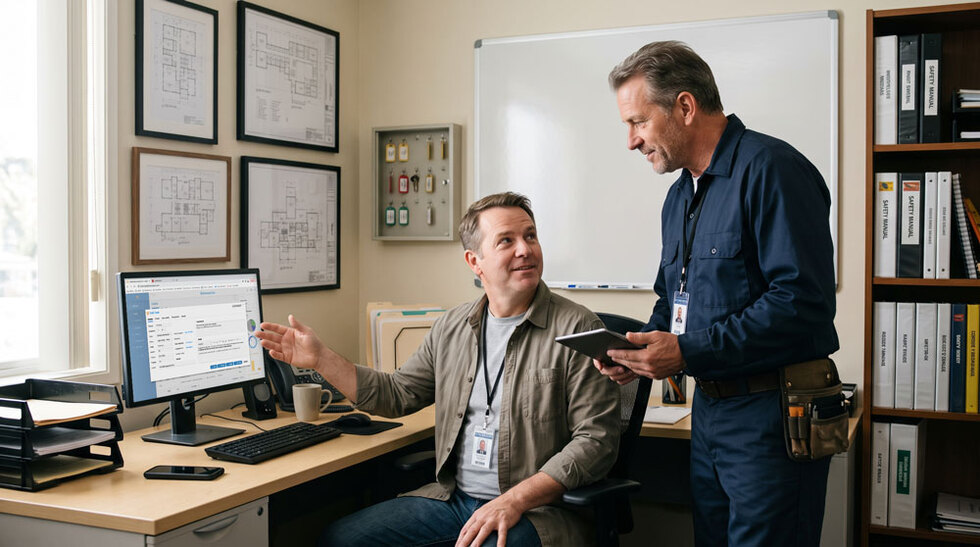
Think about how many people might be involved in maintenance across a school district. Each building may have a head custodian and additional custodial staff. District maintenance technicians travel between schools, facility managers oversee repairs and administrators may need visibility into maintenance activity.
Finance departments may also need access to maintenance costs, invoices and asset histories to monitor spending and prepare budgets. Giving the right people access can improve communication and accountability without having to rely on facilities managers to manually provide information every time it's needed.
However, when software charges for every paid user, organizations may become selective about who receives a full account. Some platforms provide free request-only access, but broader functionality may require additional paid licenses.
Consider a CMMS that charges $50 per user per month. Five paid users would already cost $250 a month, matching MaintenanceCare's flat monthly rate. Add a sixth user and that cost rises to $300. As more custodians, technicians, supervisors and finance personnel require access, those fees can add up.
MaintenanceCare includes unlimited users and Multi Facilities for $250 per month, based on yearly pricing. This allows authorized staff to have individual accounts without additional per-user charges.
Individual accounts also help avoid problems associated with shared logins. When technicians document work under their own accounts, managers can more easily identify who performed repairs, when work was completed and what still needs attention.
For an in-depth comparison of licensing models and costs, see Unlimited User CMMS: Pricing, Benefits & Cost Comparison.
Multi Facilities for School District Maintenance
Managing one school is challenging enough, but coordinating maintenance across an entire district adds another level of complexity. Facility managers need visibility into outstanding repairs, scheduled maintenance and equipment conditions across their buildings, while district technicians need access to the maintenance information relevant to the schools they service.
MaintenanceCare's capability supports maintenance management across multiple locations, helping educational organizations keep building information organized within a centralized system. Combined with mobile work orders, it provides a practical approach for teams working across multiple schools.
MaintenanceCare Pricing for Schools and Universities
MaintenanceCare offers three pricing options, ranging from a Free Forever Plan to Enterprise Elite for organizations requiring more advanced functionality.
Free Forever Plan: $0/month
Includes two users, work orders and limited preventive maintenance, assets and vendors, plus Mobile App Lite.
MaintenanceCare: $250/month
Based on yearly pricing, this plan includes unlimited users, Multi Facilities, unlimited work orders, unlimited preventive maintenance, unlimited assets, unlimited vendors and parts inventory, mobile app access and detailed reporting.
Enterprise Elite: Custom Pricing
Designed for organizations requiring advanced functionality, including Tableau reporting, enhanced onboarding, enhanced AI, enhanced custom fields, enhanced Space Center and API access.
For universities or school districts exploring connections with other institutional systems, Enterprise Elite may offer additional options. Specific integrations and implementation requirements should be confirmed with MaintenanceCare.
Compare MaintenanceCare plans and pricing.
What Educational Facilities Are Saying About MaintenanceCare
Features and pricing are important, but real experiences help demonstrate how maintenance software performs in everyday operations.
California School Facilities: Making Maintenance Easier to Manage
A California educational organization struggled with maintenance tracking, reporting and managing building assets. Working with building consultant Shayne Hale, the organization introduced MaintenanceCare to improve task tracking, preventive maintenance and equipment records.
Its experience included a costly lesson in preventive maintenance. After years without routine gutter servicing, the school faced a reported $200,000 repair and replacement bill. It subsequently added quarterly gutter maintenance to its preventive maintenance schedule.
Ease of use was another important factor.
"They were impressed by the simple interface and ease of use."
— Shayne Hale, Building Consultant
The organization subsequently implemented MaintenanceCare at two additional school facilities, demonstrating the importance of software that staff can use comfortably.
Read the California school case study: An A+ for Adaptability.
University of Washington: Keeping Campus Maintenance Connected
The University of Washington's Recreation Facility Management team adopted MaintenanceCare in 2019 to improve preventive maintenance, inspections and communication across its facilities. When operations changed during the COVID-19 lockdowns, the team continued coordinating maintenance and monitoring work remotely.
"It helped us keep business moving forward remotely during the lockdown."
— Katie Beth, Associate Director for Facilities and Operations
The experience highlights the value of accessible maintenance records, consistent task tracking and visibility across larger campus operations.
Read the University of Washington case study.
Questions Every School District Should Ask Before Choosing a CMMS
Before committing to maintenance software, there are a few important questions worth asking any provider.
Can Our Custodians Manage Daily Tasks and Submit Repair Requests Easily?
The system should make it straightforward to organize recurring responsibilities, report maintenance issues and track completed work. Whether a custodian is working through daily classroom tasks or reporting an equipment failure, the process should be easy to follow.
Can District Technicians Access Work Orders While Travelling Between Schools?
Ask how mobile assignments, equipment records and location permissions work for technicians who service multiple buildings. They should be able to access the maintenance information they need without returning to a central office.
What Does the Software Actually Cost for Our District?
Determine whether pricing depends on paid users, locations, features or additional services. Confirm what Multi Facilities means within the plan you're evaluating and consider how costs may change as more staff need access.
Can We Track Preventive Maintenance and Equipment Replacement Needs?
A CMMS should help document recurring inspections, equipment repairs and asset histories so facilities managers can make better maintenance and capital planning decisions. This information can also help finance departments monitor repair spending and evaluate where replacement budgets may be needed.
What Support Will Our Staff Receive?
Ask about implementation, training, customer support and the resources available when employees need assistance. These questions can help determine whether a platform supports your district's needs today and can continue supporting it as those needs evolve.
Frequently Asked Questions About School CMMS Software
Choosing a CMMS That Works for Your Schools
The best school maintenance software isn't necessarily the one with the longest feature list. It's the one that helps your team manage the challenges they face every day.
For smaller schools, that might mean giving a custodian a simpler way to manage daily tasks, track repairs and stay on top of preventive maintenance. For school districts, it means connecting custodians who know their buildings, technicians who travel between schools and facilities managers responsible for keeping everything running. For universities, it may mean coordinating maintenance, equipment information and reporting across a large campus.
MaintenanceCare offers work order management, preventive maintenance, mobile access, unlimited users and Multi Facilities in its paid plan, with Enterprise Elite available for organizations requiring more advanced functionality. As its educational case studies demonstrate, effective maintenance software can help teams improve visibility, coordinate work and plan ahead.
Want to see how MaintenanceCare could work for your school or university?
Explore MaintenanceCare's Education Solutions or View Pricing and Request a Demo to find the right approach for your facilities.



.svg)