


How to Turn Your CMMS Into a Proactive Reliability Tool
I recently saw a post in a popular chat forum that really hit home. Someone asked: "Has anyone actually seen a CMMS fail to reduce reactive maintenance?"
The comment section exploded, but not with tech-bashing. Instead, dozens of pros jumped in with the same hard truth: software can't fix a broken workplace culture.
They were right on the money. If your plant has messy asset data or no scheduling discipline, a CMMS just gives you a front-row seat to your own reactive fire-fighting. In a way, the software is doing its job, by showing you exactly where the leaks are.
Think of a CMMS as a high-performance engine. It's a game-changer, but it won't get you anywhere if the driver doesn't know the route. Real success happens when you use the tool to clear the path for your maintenance team, giving them repeatable routines instead of daily surprises.
The Real Cost of Firefighting
Reactive maintenance isn't just a technical problem; it takes a real toll on the people behind the tools. When you're constantly chasing the next fire, burnout becomes the default setting. It feels like you’re always playing catch-up, rushing parts orders, scrambling to get things done, and worrying about safety when things get frantic.
From "Logging Work" to Actually Caring for Assets
When a team is supported by clear processes, the CMMS stops being a chore and starts being a map. Instead of just typing in "finished" at the end of a long shift, great teams use it to stay one step ahead of the equipment.
Good maintenance care isn't about adding more paperwork. It's about making the job easier, killing off repeat breakdowns, and making sure your team has the parts and the headspace to do the job right the first time.
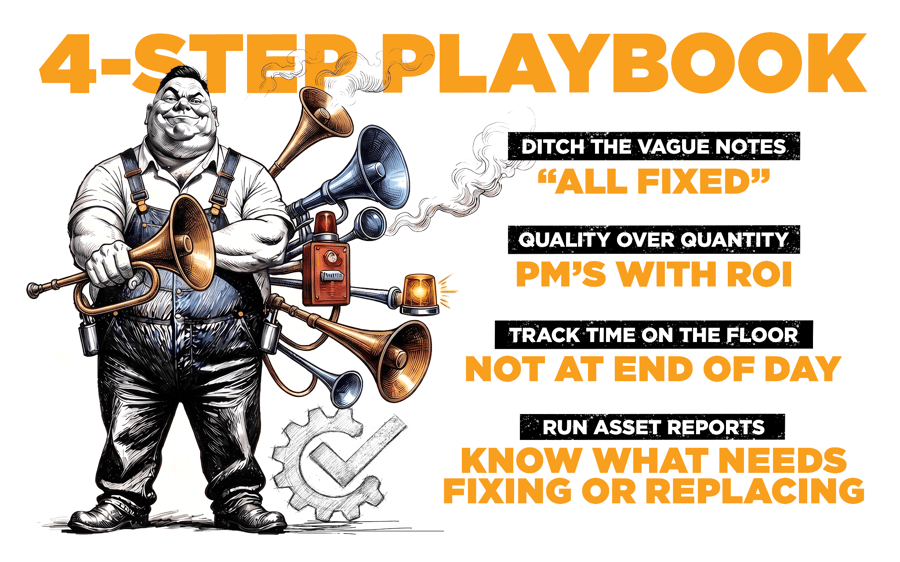
4 Ways to Get Your CMMS
Working for You
1. Standardize the "Why" to Guide Your Team
If your history is full of notes like "fixed it" or "broken conveyor," you're flying blind because of poor habits, not poor software. By using standardized categories, you make it easier for techs to provide the right info quickly, shifting their mindset from "just getting through the shift" to building a reliable data foundation. This structure helps everyone manage spare parts and inventory with confidence instead of guesswork.
2. Audit Your PMs to Combat "Checklist Fatigue"
Don't drown your team in generic checklists just to look busy. If a PM isn't directly preventing a failure mode, it's just noise that trains people to ignore the system. Cut the noise and focus on high-impact tasks to re-engage your team with condition-based care that they actually see value in performing.
3. Adopt Mobile to Remove Friction
Stop waiting until the end of a shift to dump notes, which often leads to teams forgetting critical details. Log work as it happens to eliminate the admin burden that causes technicians to resist using the CMMS. Using a mobile app on a tablet or phone meets your team where they are, making real-time tracking a natural part of their workflow rather than an after-the-fact chore.
4. Know When to Replace, Not Repair
Some machines just don't want to cooperate. When an asset is constantly breaking down, your CMMS data gives you the honest truth you need for those tough Repair vs. Replace calls. Instead of guessing, look at the cost per hour to fix it. If you're spending more on labor and parts than the machine is actually worth, or if it's constantly slowing down production, the data will back you up. Having that clear history makes it a lot easier to go to leadership and prove that replacing the unit isn't just a cost; it's a necessary step to stop the bleeding and boost your team's efficiency.
Comparing the Two Worlds
Here's the difference between just having a system and actually using it to drive reliability:
|
Maintenance Element |
The Reactive Chaos |
The Proactive Shift |
|
Data Logging |
Vague, open-text notes entered post-repair |
Structured categories & photos captured right at the machine |
|
Preventive Care |
Generic calendar-based reminders |
Smart, failure-focused tasks that actually prevent breakdowns |
|
Work Scheduling |
Unfiltered work request queue |
Doing the most important work first, not just the loudest |
|
Parts Management |
Manual stock searches during repairs |
Parts are ready and waiting before the wrench even turns |
|
Focus Metric |
Total ticket volume closed |
Longer equipment life and much less stress for the team |
How to Measure Your Progress
It's easy to track the wrong things. Instead of focusing solely on "Total Work Orders Closed," track these leading indicators:
- PM vs. Reactive Ratio: Aim for a 70/30 split between planned and reactive work.
- Mean Time Between Failures (MTBF): If critical assets go longer between breakdowns, your proactive habits are working.
At the end of the day, software alone won't fix your maintenance chaos. It’s really about a shift in mindset. When you stop looking at your CMMS as just a place to log old failures and start using it to build a better way of working, that’s when you’ll see the real impact.
Transitioning from reactive to proactive isn't going to happen overnight, and that’s perfectly okay. It’s not about perfection; it’s about persistence. Start by changing how your team interacts with the system, one entry at a time, and you’ll notice the stress levels drop before the breakdown numbers even move. You aren’t just fixing machines anymore, you’re building a culture where the team feels supported and set up for success.
Your Challenge This Week: Pick one asset that seems to break down constantly. Don't just fix it; use your CMMS to document the root cause, upload a photo, and check your parts inventory. If you can get your team to do this for just one machine, you've started the snowball effect toward a proactive culture.


.svg)