


A Comprehensive Guide to Modern Facility Work Order Management
If you run a facility, you already know what the daily grind looks like. Your morning starts with an urgent phone call about an AC unit dying in a fully occupied wing. While you’re hunting down parts, a tenant flags a leaking pipe in the hallway, and your lead technician is stuck driving back to the main office to grab a paper work order they forgot on their desk. Meanwhile, continuous safety compliance audits are looming on the calendar.
When your maintenance setup relies on sticky notes, verbal requests, messy spreadsheets, or paper tickets, critical details fall through the cracks. Technicians end up spinning their wheels, minor repairs turn into expensive equipment breakdowns, and leadership has zero line-of-sight into costs or labor.
That’s where modern work order management software comes in. By moving away from reactive firefighting and digitizing your daily workflows through a Computerized Maintenance Management System (CMMS), you give your team the clear instructions and real-time updates they need to keep your buildings running smoothly.
Key Takeaways
- What Is a Work Order in Facility Maintenance and How Does It Work?
A work order is a formal authorization to perform maintenance, acting as the primary communication bridge between service requesters, facility managers, and field technicians. - What Are the 5 Main Pillars of Work Orders?
Effective facility management balances emergency repairs, reactive corrective tickets, automated preventive checkups, routine seasonal tasks, and mandatory compliance audits. - How Does Work Order Software Improve Efficiency Across Industries?
Mobile CMMS platforms route tickets instantly, track spare parts inventory, upload photo proof, and log time right from the job site across property management, healthcare, hospitality, education, and manufacturing. - What Is the Business ROI of Automating Work Orders?
Digitizing workflows reduces unplanned equipment downtime by 30%–50%, boosts technician productivity by up to 35%, extends capital asset life, and maintains 100% audit readiness.
What Is a Work Order in Facility Maintenance and How Does It Work?
At its core, a work order is just a clear, formal green light to get a maintenance job done. It’s the primary communication bridge between the person asking for help, the operations team managing the workload, and the technician out in the field carrying out the task.
While traditional paper tickets captured basic info, like what’s broken, where it is, and who’s fixing it. A digital work orders do much more. They turn simple repair tickets into live tracking tools across five primary maintenance pillars:
1. Emergency Work Orders for Urgent Facility Repairs
These are the drops-everything, high-risk emergencies, think main plumbing line bursts, sudden heating outages during freezing weather, or power issues in critical operational areas.
- Bypasses routine approvals
- Sends instant mobile alerts
- Prioritizes on-duty technicians
- Elevates dashboard visibility
2. Corrective Work Orders for Reactive Facility Maintenance
These cover standard wear-and-tear repairs that need fixing but don't pose immediate safety threats. Examples include fixing a stuck door lock, replacing a squeaking belt, or fixing a slow drain.
- Makes up bulk of daily tickets
- Prioritized by technician skill
- Keeps backlogs manageable
- Tracks parts and labor costs
3. Preventive Maintenance Work Orders for Equipment Longevity
These are scheduled checkups designed to catch problems before equipment breaks. PMs are triggered by elapsed time or actual usage meters.
- Quarterly filter changes
- Runtime generator servicing
- Automated software generation
- Prevents costly breakdowns
4. Routine and Seasonal Facility Maintenance Tasks
These cover the predictable, repeating maintenance jobs that keep a site looking clean and running safely, like groundskeeping, floor waxing, and boiler checkups.
- Pre-winter boiler servicing
- Monthly fire extinguisher checks
- Scheduled around site usage
- Minimizes occupant disruption
5. Compliance and Audit Work Orders for Regulatory Safety
These orders focus specifically on fulfilling mandatory regulations, such as OSHA standards, Joint Commission healthcare audits, or fire system checks.
- Schedules mandatory safety audits
- Logs inspection certifications
- Stores digital compliance trails
- Prevents fines and shutdowns

Understanding the Four-Step Lifecycle of a Digital Work Order
In a modern CMMS environment, every work order moves through a simple four-step process to make sure work gets done right without anything falling off the radar:
1. Request & Intake
A tenant, employee, or manager submits a request through a quick web portal, mobile app, or by scanning a QR code on a machine. Attached photos, location tags, and priority levels are captured right at the start.
Practical Impact: Captures accurate problem details right at the start without missing information.
2. Smart Dispatch
The system flags duplicate requests and alerts the maintenance manager. Tasks are assigned directly to the right technician based on their schedule, location, or trade specialization, triggering an instant mobile push notification.
Practical Impact: Eliminates lost requests and ensures work goes to qualified personnel instantly.
3. Field Execution
Techs review equipment repair histories, safety steps, and user manuals straight from their phones on-site. They record their time, snap "before and after" photos, deduct spare parts from inventory, and log completion notes right away.
Practical Impact: Reduces office travel time and keeps technicians organized in the field.
4. Closeout & Tracking
Facility leaders review completed work data to track repair speeds, monitor technician labor hours, catch recurring equipment issues, and fine-tune preventive maintenance schedules to keep operating costs low.
Practical Impact: Provides clean data to lower operating costs and plan capital budgets.
6 Essential Features of Modern Work Order Management Systems
To ditch messy manual processes for good, a practical work order platform needs six key functional capabilities:
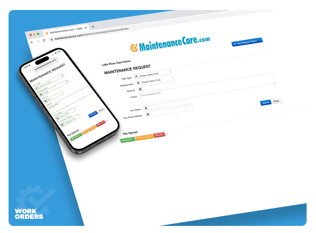
1. Centralized Intake & Automated Routing:Gathers all incoming work order requests into one central queue, no more lost emails or missed phone calls. Smart rules automatically send tasks to the right tech based on trade, location, or priority. |
 |
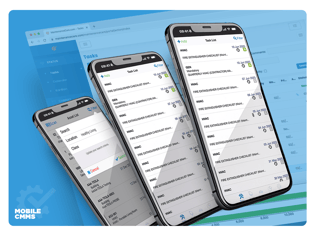 |
2. Easy-to-Use Mobile Apps
Gives your team full offline access, QR code scanning, instant mobile notifications, voice-to-text notes, and easy photo uploads directly from the job site using a mobile CMMS app. |
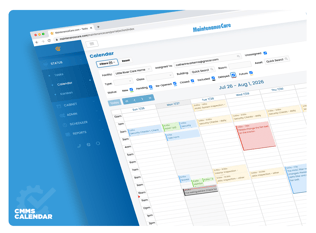
3. Automated Preventive & Compliance Scheduling:Takes the headache out of manual calendars. Automated preventive maintenance software generates maintenance tasks automatically based on fixed schedules or runtime data from IoT sensors. |
 |
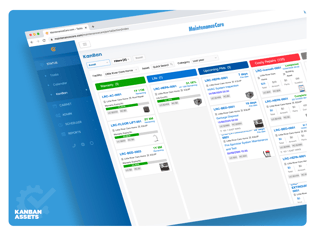 |
4. Built-in Inventory & Parts Tracking:Connects spare parts directly to active work orders. Integrated parts management deducts stock automatically, tracks spending per machine, and alerts you when stock runs low. |
5. Automatic Status Updates:With thousands of integrations, a CMMMS keeps occupants, tenants, or department leads in the loop with automated alerts as work progresses from pending to completed, saving your front office from constant "is it fixed yet?" phone calls. |
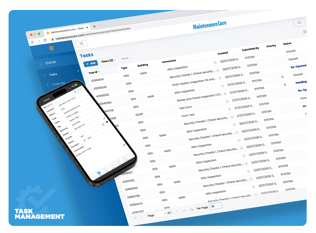 |
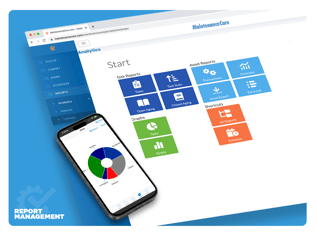 |
6. Simple Dashboards &
Puts your key maintenance metrics, like active backlogs, labor hours, contractor costs, and asset health, into clean CMMS reports while maintaining audit-ready records for safety inspectors. |
Comparing Work Order Software Requirements Across Key Industries
Different industries face totally different day-to-day challenges. A single-site factory prioritizing machine uptime needs different tools than a commercial office building managing multi-tenant leases or a senior living community handling strict health inspections. Here is how work order software adapts across sectors:
- Work Order Management Software for Commercial Property Management: Keeps tenants happy, handles quick turnovers, and tracks recoverable repair costs with tenant self-service portals, billable service tracking, and accounting system sync.
- Healthcare and Senior Living Work Order Software Solutions: Protects resident safety, maintains sanitization standards, and ensures constant inspection readiness with high-priority dispatches and life-safety equipment tracking.
- Maintenance Work Order Tracking for Hospitality and Hotels: Delivers guest comfort and fast room defect fixes through guest-facing QR code defect reporting, hotel PMS integration, and quiet mobile alerts.
- Educational Campus Maintenance Work Order Systems: Maintains student safety across sprawling multi-building campuses with spatial mapping, faculty request portals, and bulk work order capabilities during school breaks.
- Industrial Manufacturing Work Order and Asset Tracking Software: Maximizes machinery uptime and eliminates assembly line stoppages using sensor-driven triggers, detailed machine profiles, and real-time ERP integrations.
- Government and Public Works Maintenance Management Software: Protects public safety across scattered municipal assets using map-based work assignments, citizen request portals, grant-tracking logs, and budget approval checkpoints.
Facility Work Order Management Feature Comparison Matrix
| Sector | Core Focus | Essential Features | Main Business Benefit |
|---|---|---|---|
| Property Management | Tenant retention & cost recovery | Tenant portal, billable service tracking, accounting software sync | Simplifies tenant requests & streamlines cost recovery |
| Senior Living & Healthcare | Resident safety & compliance | High-priority dispatches, life-safety audit logs, compliance history | Ensures audit readiness & protects resident safety |
| Hospitality | Guest satisfaction & asset uptime | Guest defect reporting, PMS integration, quiet mobile routing | Protects brand ratings & cuts room out-of-order time |
| Education | Campus safety & seasonal work | Campus mapping, faculty intake, seasonal bulk-work scheduling | Optimizes maintenance workloads around school breaks |
| Manufacturing | Machinery reliability & uptime | IoT sensor triggers, preventive scheduling, stock management | Prevents costly assembly line downtime |
| Government & Public Works | Civic asset care & budget control | Map-based dispatches, public intake, budget tracking integrations | Extends municipal asset life & maintains fiscal transparency |

How to Choose the Best Work Order Software for Your Facility
When you're evaluating work order management tools, keep these five operational non-negotiables in mind:
Fast Team Adoption:
If your technicians find an app slow or overly complicated, they simply won't use it. Look for simple mobile designs, fast offline modes, minimal tap requirements, and voice-to-text note features.
Easy Customization Without Coding:
Choose a platform that lets your team tweak intake forms, setup routing rules, and change task stages on their own without needing software developers or paying extra vendor fees.
Seamless Integrations:
Make sure the system offers open APIs and easy connectors to plug directly into your current setup, whether that’s accounting software, building automation tools, ERPs, or tenant portals.
Room to Grow:
The platform should easily scale alongside your portfolio, allowing you to add new sites, buildings, square footage, and technicians without slowing down performance or messing up reporting.
Solid Onboarding & Support:
Software is only as good as its setup. Evaluate vendor training programs, implementation help, ongoing customer success resources, and live support availability.

Measurable ROI Benefits of Automating Facility Work Orders
Why Implementing Digital Work Order Software Drives Facility ROI
The Bottom Line: A modern work order isn't just a digital task ticket, it’s a simple way to track asset health over time. Moving from paper logging to automated work order routing gives your team immediate daily clarity, cuts down on wasted technician travel time, eliminates duplicate requests, and builds an audit-ready compliance history. Every closed ticket gives you the data you need to make smarter budget decisions down the road.
30%–50% Less Unplanned Downtime
Catching small repairs early prevents sudden equipment breakdowns and expensive contractor call-outs.
20%–35% Boost in Technician Productivity
Cutting out paper tickets, unnecessary office trips, and manual tracking lets your team focus on fixing things.
15%–25% Longer Equipment Lifespan
Consistent preventive care keeps critical equipment running efficiently well past its standard replacement timeline
100% Audit-Ready Logs
Complete digital repair logs give you an instantly searchable history for safety, health, environmental, or insurance audits.
FAQ's
Streamline Facility Operations with a CMMS Software
Moving away from paper tickets and spreadsheets is the single fastest way to take control of your maintenance budget, cut equipment downtime, and support your field team. Modern work order software gives maintenance leaders the clarity and tools they need to shift from frantic daily firefighting to smooth, proactive facility management.
Simplify your work order flows, automate preventive maintenance, and track equipment health with ease. Maintenance Care offers a clear, practical CMMS software solution designed to streamline service requests, automate task dispatches, and keep your facility fully compliant.
- Explore Practical CMMS Features: See how Maintenance Care helps organize work orders, PM schedules, and assets across your facility.
- Book a Walkthrough Consultation: Schedule a live demo tailored to your operational workflows with our team.
- Get Started Free: Try out the Maintenance Care Free Edition to experience digital work order management firsthand.




.svg)